
🔒 Introduction
Microsoft now recommends using Workload Identity Federation (WIF) with service connections instead of secrets for Azure DevOps to connect to Azure.
With WIF, Azure DevOps no longer stores long-lived secrets or passwords. Instead, it uses a trust-based identity system that issues short-lived tokens when your pipeline runs.
This modern approach means:
- 🔐 No secrets to manage or rotate
- ⏱️ No expiry headaches
- 🧱 Better protection against credential leaks
Previously, the common approach for Azure DevOps was to use service connections with stored secrets to authenticate with Azure Resource Manager (ARM).
If your project still uses this older method, you’ll now see a message like:
“Convert your existing Azure Resource Manager service connections which use secrets to authenticate to leverage Workload identity federation instead, for improved security and simplified maintenance.”
This message is a friendly reminder from Microsoft that it’s time to modernize your setup and switch to Workload Identity Federation for improved security and simplified maintenance.
We can select Workload identity federation for Credential while creating a service connection.

We still have the option for secret but selecting it will give us a warning.

💡 What Is Workload Identity Federation?
Workload Identity Federation (WIF) allows Azure DevOps to connect to Azure without storing any credentials inside your pipelines.
It works by creating a federated trust between Azure DevOps and Microsoft Entra ID (formerly Azure Active Directory).
When your pipeline runs:
- Azure DevOps requests a temporary token from Entra ID.
- Entra ID verifies that the request is coming from your project.
- It issues a short-lived access token, valid only for that specific run.
This process uses the industry-standard OpenID Connect (OIDC) protocol — the same secure mechanism used in modern password-less authentication systems.
🚀 Why Switch to WIF?
Moving to Workload Identity Federation provides both security and simplicity.
Here’s a quick comparison:
| Old (Secrets) | New (Workload Identity Federation) |
|---|---|
| Uses service principal + secret | Uses trust-based identity (OIDC) |
| Secrets expire and must be rotated | Tokens are temporary and auto-managed |
| Risk of secret leaks | No secrets stored anywhere |
| Manual setup & maintenance | Simplified configuration |
| Not aligned with Zero-Trust | Fully Zero-Trust compliant |
In short, WIF makes your DevOps pipelines safer, simpler, and future-ready.
🧩 What Actually Changes When You Convert
When you convert a service connection to Workload Identity Federation:
- Authentication changes from client secret to token exchange.
- Azure DevOps authenticates to Microsoft Entra ID using OIDC tokens instead of passwords.
- The service connection type becomes:
Authentication Type: Workload Identity Federation - Your pipelines continue working normally — just with improved security and no stored secrets.
🪜 How to Convert/Create Service Connections
Step 1: Identify Your Old Connections
Go to your Azure DevOps project:
Project Settings → Service Connections
Look for any connections labeled as “Using Service Principal Authentication” — those are the ones that use secrets.
Step 2: Try Automatic Conversion
If you see a “Convert” button next to the service connection, Azure DevOps can upgrade it for you automatically.
Click the button, and it will show a message similar to the following:
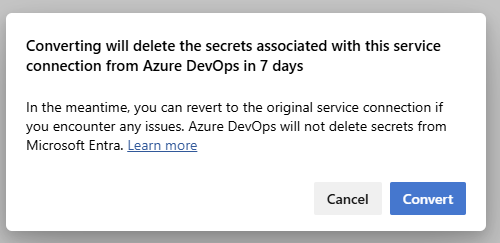
Click Convert and it will:
- Create the federated identity in Microsoft Entra ID
- Update your service connection
- Keep your pipelines working seamlessly
If that option isn’t available, follow the manual process below.
Step 3: Manual Setup (Federated Credential)
If automatic conversion isn’t available, you can set up Workload Identity Federation manually by creating a new service connection that uses Workload Identity Federation.
For detailed guidance, refer to Microsoft’s official article: Getting Started with Azure DevOps Service Connections Using Workload Identity Federation.
Step 4: Test Your Pipelines
Run a pipeline that depends on the updated service connection.
If it completes successfully — congratulations! 🎉
You’ve officially gone secret-less.
For example, here’s a simple Azure DevOps YAML snippet that uses the new connection:
- task: AzureCLI@2
  inputs:
    azureSubscription: 'Cocan-infra-conn-sec'   # your new WIF-based connection name
    scriptType: bash
    scriptLocation: inlineScript
    inlineScript: |
      az group list
If the task runs without authentication errors, your Workload Identity Federation setup is working perfectly. We will see this hands-on in the blog post Getting Started with Azure DevOps Service Connections Using Workload Identity Federation.
⚠️ Important Notes and Best Practices
- Some older Azure DevOps extensions might not yet support Workload Identity Federation.
- Ensure your Issuer, Subject, and Audience fields exactly match between Entra ID and DevOps.
- Always assign least privilege permissions to your service principal or managed identity.
- If you use shared pipelines across projects, make sure each has its own federated connection for proper isolation.
🧾 Quick Summary
| Step | Task |
|---|---|
| 1 | Identify service connections using secrets |
| 2 | Use “Convert” button if available |
| 3 | Otherwise, manually configure Workload Identity Federation |
| 4 | Test and verify pipelines |
| 5 | Delete old secrets safely |
🎯 Final Thoughts
Switching from secrets to Workload Identity Federation is one of the simplest and most impactful upgrades you can make in Azure DevOps.
It helps you:
- Strengthen your security posture
- Simplify maintenance
- Align with Zero-Trust best practices
If you still see the conversion message in Azure DevOps, take it as an opportunity — not a warning.
By making the switch now, you’re preparing your pipelines for a more secure, automated, and password-less future.